 3. Using the SDK Reference
Using the SDK
- Overview
- Lifecycle
- Configuration
- Authentication
- Callbacks
- Activation
- Deactivation
- Call
- Push notifications
Overview
The SDK interface has a facade object Wavecell.
That is the start point of all communications between client and SDK.
Lifecycle
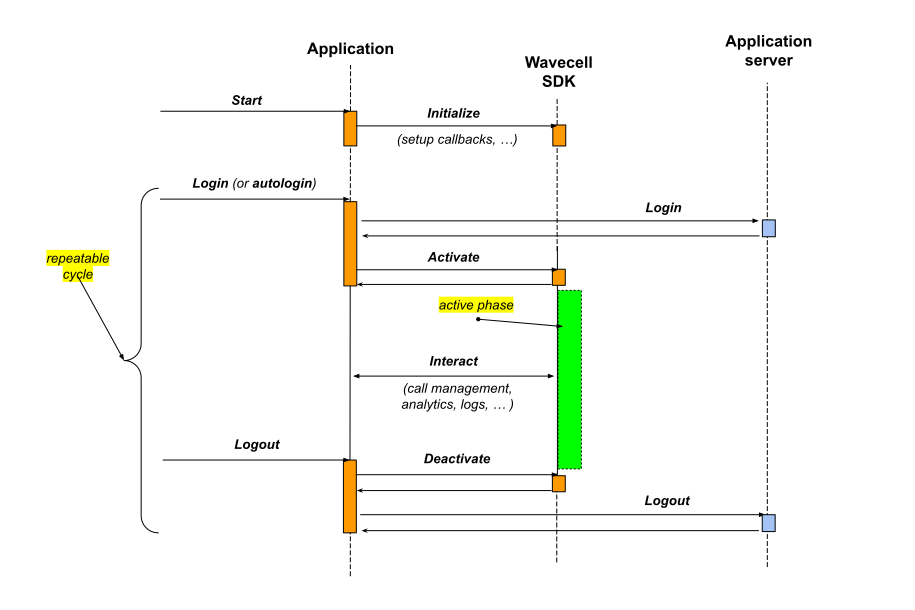
The SDK is designed to fit the concept of account based applications
where application has a login (auto-login) and logout actions.
The client initializes SDK once and then may have multiple activation/deactivation cycles following user login/logout.
Configuration
To configure SDK client assigns the appropriate configuration (WavecellConfiguration):
- User account
- CallKit
 let sdk = Wavecell.shared
 // …
 sdk.configuration = WavecellConfiguration(...)
The configuration can be updated at any time after SDK initialization.
public struct WavecellConfiguration: Hashable {
    public var accountId: String
    public var userId: String
    // …
    public var displayName: String
    public var phoneNumber: String?
    // …
    public var callKit: CallKitOptions
}
User account
The accountId and userId can only be changed when SDK is in .inactive state.
CallKit
public struct CallKitOptions: Hashable {
    public var localizedName: String
    // …
    public var ringtoneSound: String?
    // …
    public var iconFileName: String?
}
The callKit property can only be changed when there are no active calls.
Authentication
The client passes jwtToken to SDK by setting (updating) the authenticationContext property of Wavecell object:
 let context = AuthenticationContext(jwtToken: "Token Value") { token in
    // token refresh is requested
 }

 sdk.authenticationContext = context
Callbacks
The SDK uses callbacks to expose (or request) the data to the client:
- Logs
- Contact resolution
Logs
  Wavecell.logMessageCallback = { module, message, level, context in
    // print log message to the console
  }
The client may want to set the log message callback before the SDK initialization.
Contact resolution
  Wavecell.contactResolverCallback = { context, completion in
     // …
     let contact = ContactInfo(contactId: context.callerId,
                               displayName: context.callerName,
                               avatarUrl: nil, phoneNumber: nil)
     completion?(contact)
  }
The SDK may request the contact details on incoming call notification.
The client can adopt the Contact protocol and return the adjusted information in a completion handler.
struct ContactInfo: Contact {
    var contactId: String
    var displayName: String?
    var avatarUrl: String?
    var phoneNumber: String?
    // …
}
Activation
To activate Wavecell client invokes the activate function:
public func activate(completion: @escaping (_ result: RtcResult<Void>) -> Void)
 sdk.activate { result in
   switch result {
   case .success:
     //…
   case .failure:
     //…
   }
 }
On .success, the Wavecell object transitions to .active state.
Otherwise, it comes back to .inactive state.
enum State {
  case inactive, activating, active, deactivating
}
//…
sdk.state
The client may adopt the WavecellStateObserverProtocol protocol and receive notifications on Wavecell object state change:
public func addObserver(_ observer: AnyObject)
sdk.addObserver(client)
//…

func handleStateChanged(_ state: WavecellState) {
    // …
}
Deactivation
To deactivate Wavecell client invokes the deactivate function:
public func deactivate(completion: @escaping (_ result: RtcResult<Void>) -> Void)
 sdk.deactivate { result in
   switch result {
   case .success:
     //…
   case .failure:
     //…
   }
 }
On completion, the Wavecell object transitions to .inactive state regardless the actual result.
Call
- Place an outgoing call
- Receive an incoming call
- Call observer protocol
Place an outgoing call
func placeCall(callType: CallType, to callee: Contact,
               completion: @escaping (RtcResult<VoiceCall>) -> Void)
  //…
  let completionBlock: (RtcResult<VoiceCall>) -> Void = { result in
       switch result {
       case .success(let call):
        // present UI
       default: break
       }
       completion(result)
  }
  let parameters = OutgoingCallParameters(callType: .voip, callee: callee)
  sdk.placeCall(with: parameters, completion: completionBlock)
  //…
Receive an incoming call
The client should adopt WavecellCallSetObserverProtocol protocol and register as an observer at Wavecell object.
class MyWavecellClient: WavecellCallSetObserverProtocol {
//…
  func handleCallAdded(_ call: VoiceCall) {
     if call.direction == .inbound {
       // present UI
     }
  }
//…
}
let client = MyWavecellClient(...)
//…
sdk.addObserver(client)
Call observer protocols
The VoiceCall object is an observable. The client may adopt the following protocols:
VoiceCallStateObserverProtocolVoiceCallConnectionQualityObserverProtocolVoiceCallMutedStateObserverProtocol
and register as an observer at VoiceCall object.
//…
call.addObserver(client)
//…
Mute a call
The VoiceCall object has a property muted:
public protocol VoiceCall: class {
    //…
    var muted: CallMutedState { get set }
    //…
}
The client can mute/unmute the call by assigning the corresponding value:
call.muted = .on // .off
Put a call on hold
func hold(_ completion: ((CallActionCompletionStatus) -> Void)?)
func resume(_ completion: ((CallActionCompletionStatus) -> Void)?)
  call.hold { status in
    switch status {
    case .done:
      //
    case .canceled:
      //
    case .failed:
    }
  }
The execution of hold (resume) operation implicitly triggers the call state change.
Hang up a call
func hangup(_ completion: ((CallActionCompletionStatus) -> Void)?)
  call.hangup { status in
    switch status {
    case .done:
      //
    case .canceled:
      //
    case .failed:
    }
  }
On completion the call transitions to disconnected state.
Also the SDK remove the call from the calls list.
Push notifications
The SDK handles PushKit notifications internally.
For debugging purpose, the SDK makes it transparent for the client:
The
Wavecellobject has apushTokenproperty.
In order to monitor the push notification payload or observe the token change - the client may adoptWavecellPushNotificationObserverProtocolprotocol.